
By Rajeshwar R ·
How C# and .NET Help Build Reliable Fire Alarm Monitoring Applications in Building Management Systems
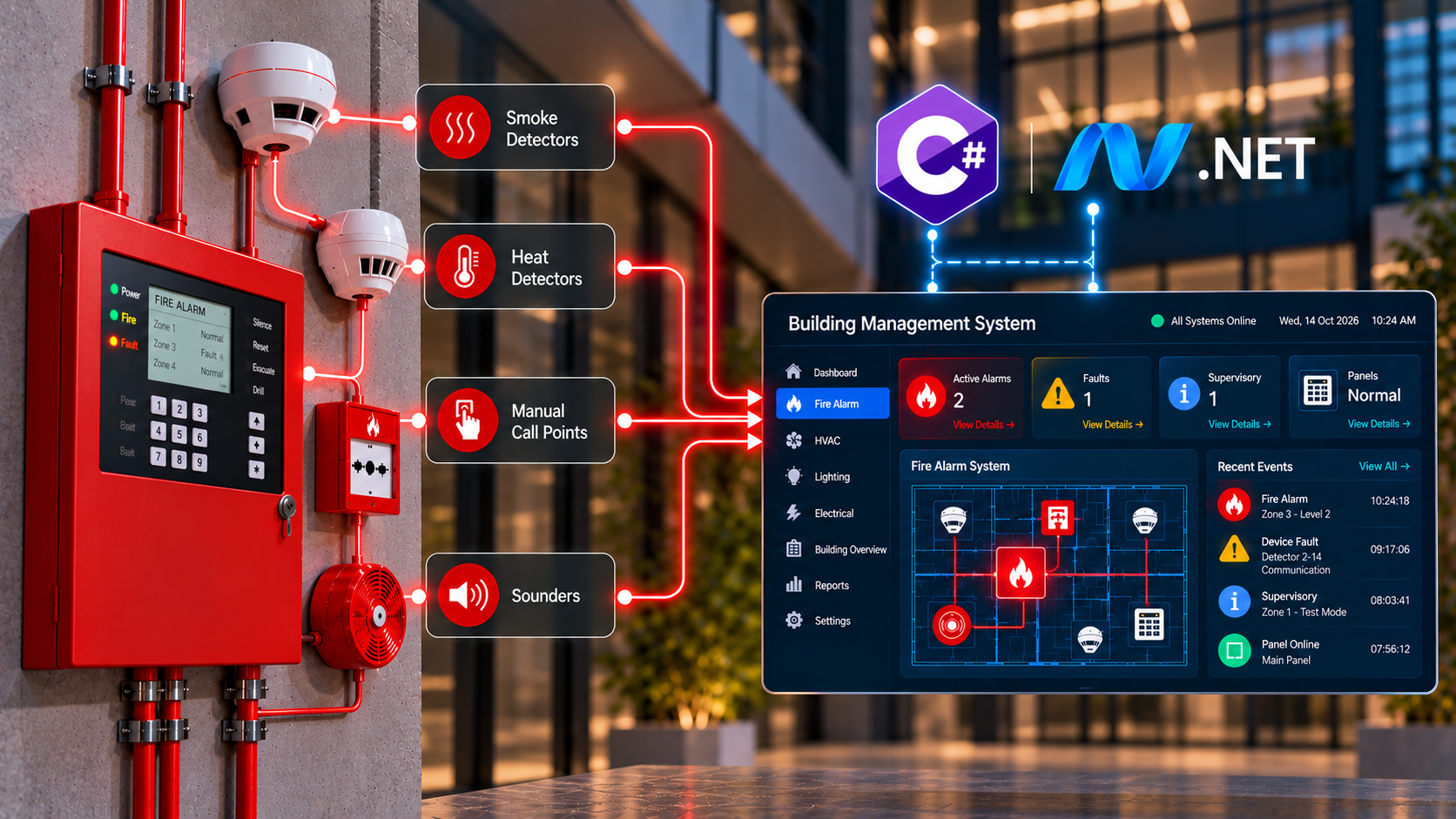
In modern buildings, fire safety is no longer just about installing smoke detectors, heat sensors, and alarm panels. Building operators also need a reliable way to monitor these devices, identify faults, track alarm events, and respond quickly when something goes wrong. This is where software plays an important role.
As Full Stack Engineer, I see how application development can improve the way fire alarm systems are monitored and managed. Among the different technologies available, C# and the .NET ecosystem provide a strong foundation for developing fire alarm monitoring applications, especially in industrial and commercial environments.
But what makes .NET a good choice for this type of application? Let's explore.
Connecting Fire Alarm Systems with Software
A typical fire alarm system consists of control panels, smoke detectors, heat detectors, manual call points, sounders, and other field devices. These components communicate with a fire alarm control panel, which processes events and activates the appropriate alarms.
In a building equipped with a BMS, operators may also need to view fire alarm information alongside HVAC, electrical, and other building systems.
A C# application can act as a monitoring layer that collects and presents this information through a centralized interface.
For example, an application can display:
- The current status of fire alarm panels.
- Active fire alarms and their locations.
- Device faults, communication failures, and supervisory events.
- Alarm history with timestamps.
- Panel connectivity and system health.
The application can receive this information through a supported integration interface, such as a manufacturer-provided API, a gateway, or an approved communication protocol.
One important consideration is that not every fire alarm panel exposes the same interface. Integration depends on the panel manufacturer, the available protocol, and the system's configuration.
Why C# and .NET Are a Good Fit
C# is a strongly typed programming language, while .NET provides the runtime, libraries, and frameworks required to build desktop applications, web services, and background processing systems.
Together, they offer several advantages for BMS applications.
Strong support for Windows-based applications
Many industrial monitoring environments use Windows-based computers for control rooms and operator workstations. With .NET, developers can build desktop applications using Windows Presentation Foundation (WPF) or Windows Forms.
WPF is particularly useful when the application requires a rich graphical interface.
For example, a fire alarm monitoring screen can display a building floor plan, highlight the location of an alarm, show device status, and provide an event panel for operators.
Instead of switching between multiple tools, operators can view relevant information in one application.
Reliable background processing
A monitoring application should not depend entirely on what is visible on the screen. It must also process incoming events, maintain communication with connected systems, and record important changes.
.NET supports asynchronous programming through async and await, background services, cancellation tokens, and other concurrency mechanisms.
These features help developers handle multiple communication tasks without unnecessarily blocking the user interface.
For example, while the application receives updates from several fire alarm panels, the operator should still be able to navigate the floor plan, inspect device details, and review historical events.
Strong data handling capabilities
Fire alarm monitoring systems generate events that may need to be recorded for operational review, troubleshooting, and reporting.
C# can work with databases such as SQL Server and PostgreSQL through libraries and frameworks including Entity Framework Core and database-specific drivers.
A well-designed application can store:
- Event timestamps and event identifiers.
- Panel and device information.
- Alarm, fault, and supervisory event types.
- Acknowledgement details, where supported.
- Communication status changes.
- Historical event records.
This information helps maintenance teams investigate recurring faults and understand how the system behaved over time.
Database records should complement, not replace, the authoritative event history and safety functions of the fire alarm control panel.
Integrating Fire Alarm Panels with a BMS
One of the more challenging parts of building a fire alarm monitoring application is communication with the existing equipment.
Different manufacturers support different integration methods. Some provide proprietary SDKs or APIs, while others support interfaces through approved gateways or standardized protocols.
C# is useful because it provides a flexible environment for integrating these different sources.
For example, a .NET application might use:
- BACnet/IP: Where the fire alarm equipment or an approved gateway exposes the required information through BACnet.
- Modbus TCP: Where supported by the panel or integration gateway.
- REST APIs: For systems that provide HTTP-based interfaces.
- WebSockets: For receiving live updates from a backend service or integration gateway.
- Vendor SDKs: For manufacturer-specific functionality and event access.
The availability of these options depends on the equipment. A developer should never assume that every fire alarm panel supports every protocol.
A useful architectural approach is to create a separate integration module for each supported interface. Each module converts incoming messages into a common internal event format.
For example, a normalized event might contain a panel ID, device ID, event type, timestamp, and source information.
The rest of the application can then process events consistently, without needing to know the details of every manufacturer's communication protocol.
This separation also makes it easier to add new panel models or replace an integration gateway in the future.
Practical Architecture of a Fire Alarm Monitoring Application Using C# and .NET
The following diagram illustrates how fire alarm devices communicate with a C#/.NET application through integration services. The application processes alarm events, stores historical records, and presents real-time information through desktop and web dashboards.
Building a Real-Time Monitoring Dashboard
The monitoring dashboard is where operators interact with the system. A good dashboard should make important information easy to identify without overwhelming users with unnecessary details.
Using C# and WPF, developers can build an interface that includes a building overview, device status indicators, an active event list, and detailed information about selected devices.
Consider a simple scenario.
A smoke detector in the second-floor electrical room reports an alarm condition through the fire alarm panel. The integration layer receives the event and forwards it to the application.
The application can then:
- Validate and process the incoming event.
- Record the event with its source and timestamp.
- Identify the associated building, floor, and room.
- Highlight the relevant location on the floor plan.
- Display the event in the active alarm list.
- Update the interface when further information becomes available.
This provides operators with useful context instead of presenting only a device number or a short alarm message.
For larger buildings, the same concept can be extended to multiple floors, buildings, or sites.
When combined with BIM or digital twin technology, the application can also associate fire alarm devices with spatial building information, making it easier to locate affected areas.
However, the dashboard must accurately represent the underlying system state. A missing update or disconnected panel should not be displayed as though the device were operating normally.
Handling Alarm Events and Priorities
Not every event in a fire alarm system represents the same condition. A fire alarm, a device fault, and a communication failure have different operational implications.
A monitoring application should preserve the event classifications provided by the fire alarm system rather than treating every incoming message as an equivalent alert.
In a .NET application, this can be managed through a structured event-processing layer.
For example, the application might distinguish between:
- Fire alarm events.
- Fault and trouble events.
- Supervisory events.
- System communication failures.
- Restorations and state changes.
The event processor can update the relevant display, maintain the event history, and notify the appropriate application components.
It is also important to distinguish between receiving an event, displaying it, and acknowledging it. These are separate operations, and their meanings depend on the panel and its integration interface.
For instance, acknowledging an event in a BMS dashboard must not be assumed to acknowledge or silence the fire alarm control panel. If such functionality is supported, it must follow the manufacturer's documented interface and the applicable safety requirements.
Designing for Reliability and Fault Recovery
A fire alarm monitoring application needs more than a responsive interface. It must also handle situations where communication is interrupted, services restart, or incoming data arrives unexpectedly.
.NET provides several tools that help developers design for these conditions.
Communication monitoring
The application can monitor the connection status of each panel or gateway and identify when communication is lost. A communication failure should be represented as an explicit system condition rather than silently ignored.
Reconnection and recovery
Where the integration protocol supports it, the application can attempt to restore communication after a connection failure. Reconnection logic should use bounded retries, appropriate delays, cancellation support, and clear error reporting. After reconnecting, the application may need to retrieve the current panel state to reconcile any events missed during the outage.
Structured logging
.NET logging abstractions allow developers to record diagnostic information from different application components. Logs can help engineers investigate connection failures, malformed messages, processing errors, and unexpected application behaviour. Operational event history and diagnostic logs should remain separate because they serve different purposes.
Separation of responsibilities
A maintainable application should separate communication, event processing, persistence, and presentation into different components.
For example:
- An integration service handles communication with the panel.
- An event processor validates and normalizes incoming events.
- A persistence service stores the relevant records.
- A presentation layer updates the dashboard.
- A monitoring service tracks communication health.
This design makes the application easier to test, maintain, and extend.
Where Azure and Cloud Services Fit In
Although many BMS applications run locally, some deployments also require centralized monitoring across multiple buildings.
In these scenarios, .NET can work with cloud services to provide remote reporting, centralized event collection, and cross-site analytics.
For example, a local gateway may collect information from supported fire alarm panels and securely forward selected telemetry to a central service. A cloud-hosted .NET backend can then process the incoming data and make it available to authorized users.
However, cloud connectivity should not become a dependency for essential local fire alarm functions. The certified fire alarm system must continue performing its required safety functions independently of the monitoring application's internet connection.
A practical architecture keeps safety-critical alarm processing in the approved fire alarm equipment and uses the BMS application for supplementary monitoring and information management.
Security Considerations
Fire alarm monitoring applications are part of a building's operational technology environment, so security needs to be considered from the beginning.
A .NET application should use appropriate authentication, role-based authorization, secure communication, input validation, and protected configuration for credentials. Remote access should be restricted to authorized users. Administrative actions and supported control operations should be logged, and unnecessary access to fire alarm equipment should be avoided.
Developers should also consider network segmentation between building systems and general-purpose IT networks. Where an application integrates with multiple building systems, each connection should expose only the capabilities required for its intended purpose. These measures help reduce the risk of unauthorized access, accidental changes, and disruption to building operations.
What C# Cannot Replace
C# and .NET are powerful application development technologies, but they do not automatically make an application suitable for life-safety control.
There is an important distinction between a fire alarm monitoring application and a certified fire alarm control system.
The monitoring application can display events, provide historical information, help operators locate affected devices, and support maintenance activities. The fire alarm control panel remains responsible for its approved detection, alarm, supervision, and control functions.
If an application is intended to perform safety-critical control rather than supplementary monitoring, its design, hardware interfaces, software lifecycle, validation, certification, and deployment must meet the applicable regulatory and product requirements.
Using a modern programming language or a reliable framework alone does not satisfy those requirements. Understanding this boundary is essential when developing software for buildings where human safety is involved.
Conclusion
C# and .NET offer a practical foundation for building fire alarm monitoring applications within a Building Management System. Their support for Windows desktop development, asynchronous processing, database integration, communication services, and modular architecture makes them well suited to applications that need to present building events clearly and process information reliably.
For BMS software engineers, the real advantage is not simply the ability to create a dashboard. It is the ability to connect different systems, organize incoming events, maintain useful historical records, and provide operators with the information they need to understand what is happening inside a building.
When designed with proper fault handling, security, and clear separation from safety-critical fire alarm functions, a .NET-based application can become a valuable part of a modern building monitoring platform.
As buildings become more connected and digital twin technologies continue to evolve, the combination of C#, .NET, and building-system integration will remain useful for developing more informative and maintainable monitoring solutions.
Was the blog insightful?
Subscribe to our newsletter so you never miss an update